
Release 0.3.0-draft.1 · Development standards
Geist carries the identity with a clear, contemporary voice. Regular headlines provide confidence through scale and space, while body copy stays comfortable to read.
A flexible hierarchy
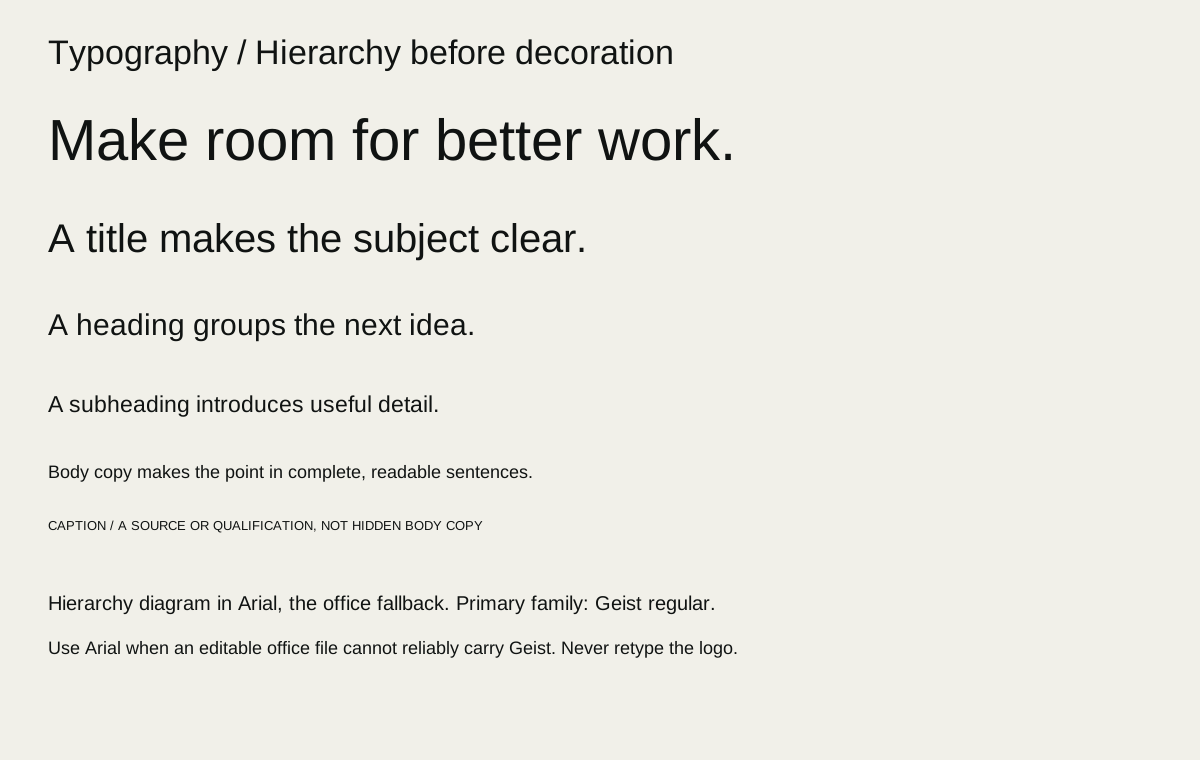
These are recommended starting ranges, not a copy of website styles. Choose by viewing distance, copy length and medium; reduce scale before breaking a heading into awkward fragments.
| Role | Digital starting range | Print/slides starting range | Guidance |
|---|---|---|---|
| Display | 40–88 px | Cover 30–56 pt; slides 36–64 pt | Geist 400; 0.98–1.12 line height; modest tight tracking |
| Section heading | 26–40 px | 18–30 pt | Geist 400; 1.1–1.25 line height |
| Subheading | 20–26 px | Print 13–18 pt; slides 28–36 pt | 400–500; 1.2–1.35 line height; subordinate to section heading |
| Body | 16–20 px | Print 10.5–12 pt; slides 20–28 pt | 400; 1.45–1.7 line height |
| Label / button | 14–16 px | 10–12 pt | 400–600; concise, sentence case |
| Caption / notes | 13–15 px | 9–10 pt | Do not compress vital information into footnotes |
| Data / tables | 14–18 px | 10–12 pt; slides 18–24 pt | Align numbers; use tabular figures where available |
Start display tracking around −0.02em and body at normal spacing. Avoid applying tight display tracking, all caps or condensed line spacing to paragraphs. Body measures of roughly 45–75 characters aid comfortable reading; narrow screens may require shorter lines. Keep paragraph spacing visibly greater than ordinary line spacing.
Use emphasis sparingly: one highlighted phrase or one weight change should be enough. Do not turn every important sentence into a bold block. Functional labels may use medium/semibold, but do not make heavy headlines the default.
Titles, subtitles and heading sequence
Use the main title to state the subject or promise; use a subtitle to explain context, not to repeat it. A subtitle typically sits between body and section-heading size at regular weight, with more relaxed line spacing than the display title. Do not imitate hierarchy by colouring every line differently. Keep H1/title → H2/section → H3/subsection progression logical, and use style names in editable documents rather than hand-formatting each instance. In an interface, visible size may adapt but semantic heading order remains meaningful.
Keep headings closer to the content they introduce than to the previous section. Aim for roughly 1.5–2 times the ordinary paragraph gap before a heading and a smaller gap after it. Avoid single-word final lines where a natural alternate line break exists; do not damage the sentence to make a shape. Links need an identifiable treatment beyond an arbitrary colour change. UI labels should remain readable at their actual control size and must not rely on placeholder text.
See the type hierarchy specimen.
Files, fallback and languages
Geist’s local variable font and its OFL licence are the source reference. Keep licence text with redistributable font packages and verify the actual files used in a delivered template. Retain editability and embed fonts where the format and licence allow it. When Geist cannot be installed, use a deliberate Arial fallback and reflow/review the document; substitution is a compatibility choice, not a second identity family. Do not assume every script or glyph is covered: test names, currency, punctuation and the actual language required.
The Source Serif files in earlier review assets belong to a superseded proposal. Their presence and licence do not authorise their use in this direction. Do not use serif headlines, decorative code fonts or synthetic extra weights as an automatic route to variety.
Specimen checks: “Make room for better work.”; “AI Readiness Roadmap”; “13 October 2026 · R1,250”; long organisation names; accented names; a two-line button; a numeric table; an underlined link; and a paragraph at actual size.
Operating rules
TYPE-001 — Keep Geist regular at the centre
- Do: Use Geist regular for display and headline hierarchy.
- When: Brand headlines and covers
- Variation: Scale, line breaks and restrained emphasis suited to the medium.
- Avoid: Serif replacement directions or heavy weights as the default display voice.
- Check: Compare headline specimens across campaign, document and interface.
TYPE-002 — Protect reading comfort
- Do: Choose body size, measure and spacing for the actual reading environment.
- When: Documents, tools and detailed content
- Variation: Increase type size and simplify content for distance or accessibility.
- Avoid: Tiny disclaimers, compressed paragraphs or display tracking in body text.
- Check: Read at intended size; test zoom, reflow and long content.
TYPE-003 — Deliver usable typography
- Do: Include permitted font/licence files or document the fallback.
- When: Agency and office handover
- Variation: Arial fallback with a reviewed reflow when Geist is unavailable.
- Avoid: Calling missing or substituted fonts a verified editable template.
- Check: Reopen the file on the target application and inspect glyphs and wraps.