
Release 0.3.0-draft.1 · Development standards
Use Logo v3 as supplied. Its distinctive geometry carries recognition across expressive images, quiet documents and functional tools.
Artwork and variants
Use the supplied ink and off-white vector variants. Keep all nine visible paths, compound counters, proportions and relationships unchanged. The SVG canvas contains whitespace: alignment and clear-space measurement must use visible artwork bounds. A flattened PSD or PNG is an export, not an editable vector master. Keep source masters unchanged and identify normalised derivatives separately.
Measurable development proposals
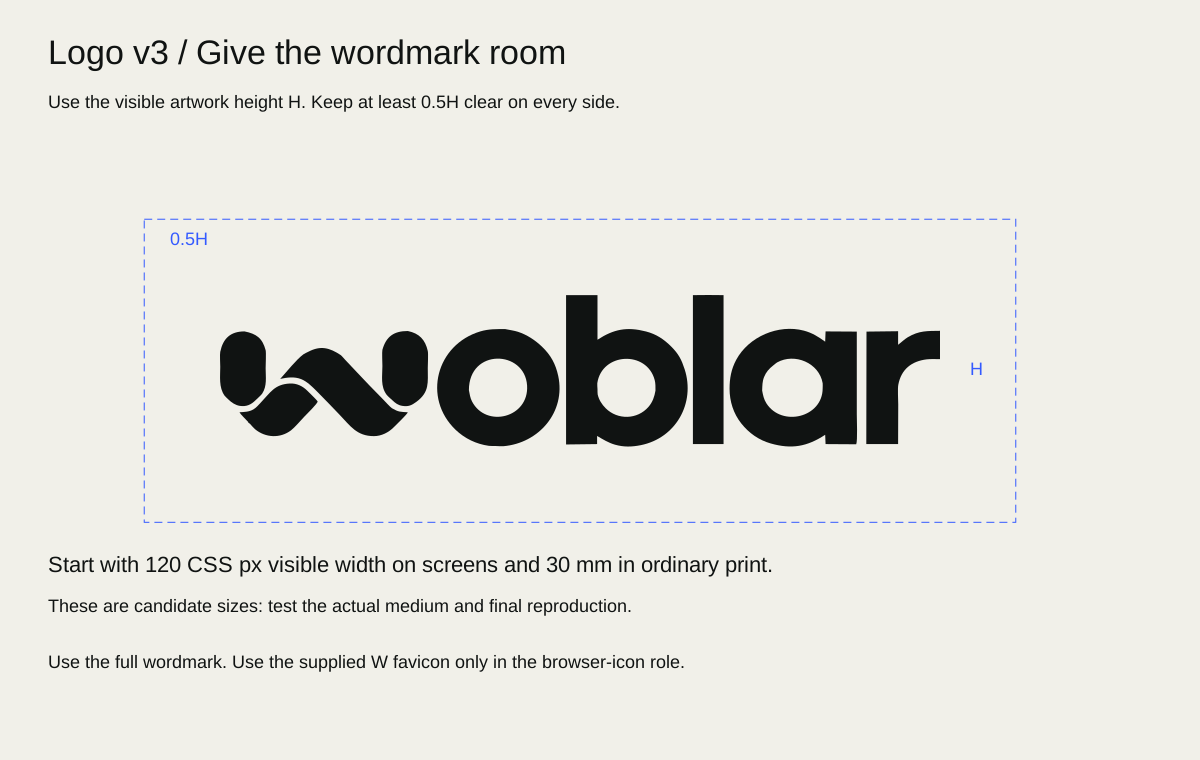
Let H be the height of the visible wordmark, excluding empty canvas. Reserve a clear zone of 0.5H on all sides; favour H on uncluttered covers and end cards. No typography, divider, crop boundary or high-contrast image edge may enter that zone. Background colour may continue through it. For a visible mark 20 mm high, the proposed minimum clear zone is 10 mm on every side. Measure after placing the artwork, not from the file’s page box.
For digital prototypes, begin at 120 CSS px visible width or larger. For print proofs, begin at 30 mm visible width or larger. These are candidate test sizes, not established reproduction minima. Compare 80/96/120/144 px on common screens and 20/24/30/36 mm on the intended stock. Inspect counters, edge clarity and reading at normal distance before accepting a minimum. Embroidery, engraving, vinyl and foil need their own supplier samples. The separately sourced favicon below is available for its narrow browser role; this does not approve a general small-format symbol.
Align the mark optically with the text column or document margin; never compensate by stretching it. On photography, place it in a stable quiet field or a separate solid band. If no safe area remains after cropping, change the composition.
Placement and the browser favicon
On a document cover, place the wordmark on the main text alignment, usually upper left or a deliberate lower-left signature. On letterhead, keep it above the correspondence area and out of the address/body flow. In a presentation, use a confident cover placement and a restrained consistent interior signature only where useful. In a campaign, place the mark in the quiet field, not on the image’s focal detail. End cards should hold the upright mark and one clear next action long enough to read.
The existing Woblar Logo v3 / 07 Favicon package records an approved-derived W favicon made in VectorCraft on 2026-10-13: four original W paths grouped on an opaque ivory square, with SVG, 16/32/512 PNGs and a native editable source. The package records visual inspection at those sizes and states it is not deployed; no ICO is included. Use that source for the browser favicon, preserving its proportions and background. This is a narrow browser application, not permission to extract another W, create an app icon, substitute the symbol for the full wordmark in stationery or treat it as a general sub-brand mark. New icon contexts require an explicit application review.
Measured full-wordmark visible bounds are x=152.8342–2009, y=155.6503–546.3088 in the original 2163×727 canvas; visible aspect ratio is approximately 4.75138:1. These geometric measurements support placement, not print legibility approval. Tight-viewBox derivatives must preserve path data and remain traceable to the source.
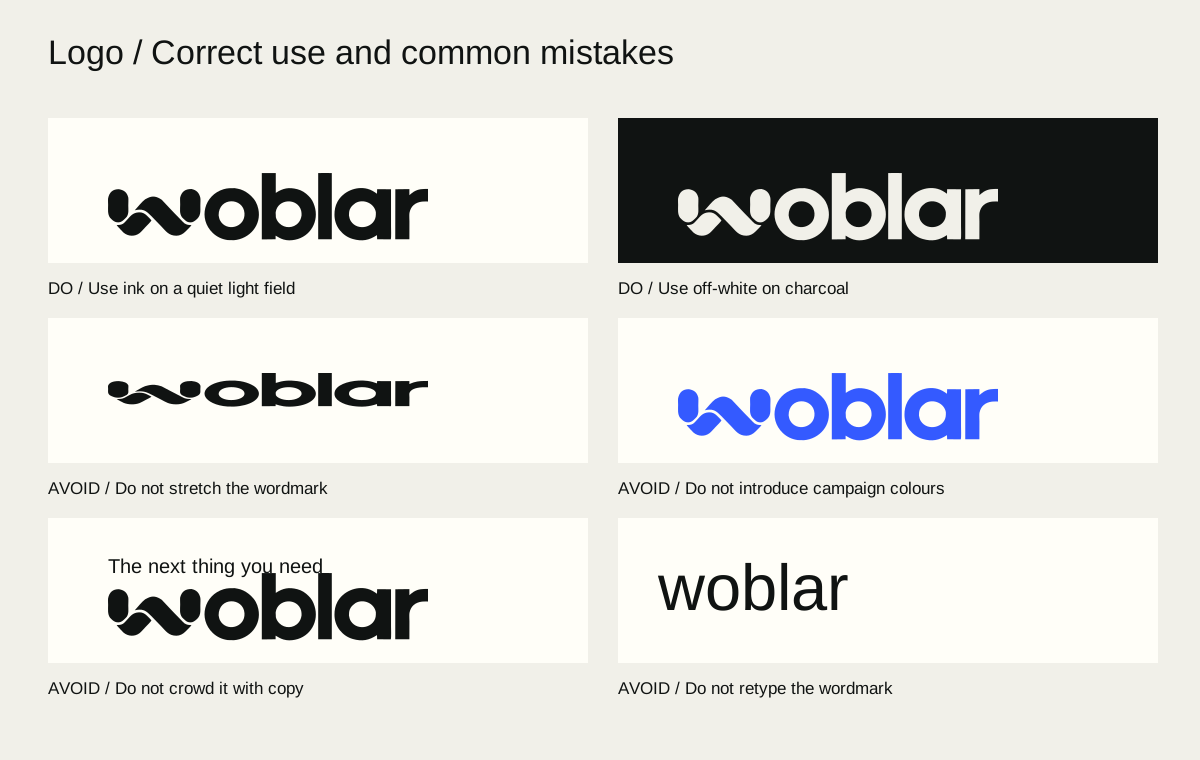
See the clear-space specimen and use/misuse plate.
Misuse and correction
| Incorrect | Correct alternative |
|---|---|
| Stretch to fill a banner | Scale uniformly; leave space |
| Rotate for energy | Keep upright; create energy through crop |
| Recolour cobalt | Use the supplied ink or off-white variant |
| Glow, bevel or drop shadow | Use clean artwork on a readable field |
| Fill or distort counters | Restore the vector master |
| Retype “Woblar” | Place the supplied wordmark |
| Crop the mark | Reframe the surrounding image |
| Place over busy detail | Add a quiet field or move the mark |
| Squeeze against a title | Restore the 0.5H proposed clear zone |
| Use an old export | Locate Logo v3 in the asset register |
| Build a “Woblar × Agent” mark | Separate role wording from the master logo |
A logo misuse plate should show the correct sample beside the error and identify the violated rule; do not distribute incorrect samples as reusable assets.
Operating rules
LOG-001 — Preserve Logo v3
- Do: Use supplied Logo v3 geometry and proportions unchanged.
- When: Every logo placement
- Variation: Uniform scaling and selection of the supplied ink/off-white variant.
- Avoid: Retyping, regeneration, stretching, recolouring or extracting an unofficial symbol.
- Check: Compare paths and source hashes; inspect the visible mark.
LOG-002 — Give the mark space
- Do: Use the proposed 0.5H visible-artwork clear zone in development layouts.
- When: Covers, stationery, campaigns and interfaces
- Variation: Increase to H or more; resolve compact exceptions through review.
- Avoid: Measuring from empty SVG canvas or calling this a print-tested minimum.
- Check: Measure visible bounds and nearest competing element.
LOG-003 — Test reproduction at use size
- Do: Proof candidate sizes and processes before physical production.
- When: Small or physical logo use
- Variation: Larger artwork or a simpler application when detail fails.
- Avoid: Calling a mockup, raster master or proposed size production-approved.
- Check: Inspect real-size output and record supplier, process and accepted proof.
LOG-004 — Use the existing favicon only in its documented role
- Do: Use the approved-derived favicon source for browser identification, with its original W proportions and ivory background.
- When: Website browser tabs and documented favicon exports.
- Variation: Select the provided SVG or size-appropriate PNG; retain the native source for editing.
- Avoid: Improvised W extraction, general wordmark replacement or claiming deployment without checking it.
- Check: Compare against the 07 Favicon source and inspect the actual browser at small size.