Woblar / Brand library0.3.0-draft.1 · Review edition

Woblar / 0.3.0-draft.1 / Review edition

Brand handbook.

Development guidance. Exact production approval remains pending.

Brand foundations

Release 0.3.0-draft.1 · Development standards

Make room for better work. The brand should help a person recognise a problem, understand a useful possibility and see a credible next step.

The working position

Woblar helps South African business owners make everyday work more useful by connecting their tools, designing focused workflows and keeping responsibility clear. This is the working positioning for development, grounded in the non-blog website and owner direction. It is not validated customer research.

Category: practical AI and automation for South African businesses. Organising idea: Make room for better work. Promise to express: focused help with real work, with clear responsibility. This is a service intent, not a guaranteed business outcome.

PrincipleDesign consequenceCopy consequence
Useful before impressiveShow the task and next step before decorative complexityName the work: enquiries, follow-ups, repetitive admin
Human responsibilityMake the review point visibleSay who reviews and who acts
Considered ambitionGive one idea room; use confident material imageryInvite progress without claiming inevitability
Practical continuityCarry recognisable identity across different formatsStart with existing tools and actual constraints

The likely reader owns a business or makes operational decisions, recognises recurring friction and wants help without becoming an AI specialist. Treat this as an audience hypothesis. Interviews, delivery evidence and actual objections should refine it.

Differentiation should emerge through specificity: a bounded workflow, visible ownership and useful implementation detail. Do not turn these intentions into claims that competitors lack them. Current service names and capability statements are documented evidence; market leadership, quantified savings and client satisfaction require separate substantiation.

Introductions to use as draft starting copy

One sentence: Woblar helps South African businesses use practical AI and automation in everyday work.

Short description: Woblar helps business owners connect their tools and design focused workflows around their people. Start with a clear business problem, identify one useful improvement and keep responsibility visible as the work changes.

Message order: recognisable work → useful assistance → responsibility and limits → meaningful next step.

Operating rules

SRC-001 — Use the permitted evidence set

  • Do: Exclude all blog writing, images and style from brand decisions and prompts.
  • When: Research, briefing, design and content
  • Variation: Inventory blog URLs for completeness only.
  • Avoid: Reusing blog material because it is on the same website.
  • Check: Inspect references, copied text and image provenance.

FOUND-001 — Make usefulness observable

  • Do: Name the reader, the task and the intended next step before choosing an expression.
  • When: Any new communication
  • Variation: Change the scenario and depth to fit the audience.
  • Avoid: Aesthetic direction without a business purpose.
  • Check: A reviewer can state who this is for and what to do next.

FOUND-002 — Separate belief from evidence

  • Do: Label audience assumptions and commercial hypotheses until supported.
  • When: Positioning, proposals and agency briefs
  • Variation: Use owner-approved service descriptions with their source.
  • Avoid: Invented interviews, differentiators or customer results.
  • Check: Each factual claim has a traceable source and review date.
Handbook contents · AI rules

Architecture and naming

Release 0.3.0-draft.1 · Development standards

Woblar is the master brand. Services, tools and agents should help people find their way without making the organisation look like a collection of unrelated companies.

One master brand, clear descriptors

Woblar
├── Services
│   ├── AI Readiness Roadmap
│   ├── AI Workflow Starter
│   ├── Workflow Care
│   └── Search visibility capability
├── Tools / capabilities
│   ├── Business Pulse Check
│   └── Decision Engine — confirm public context before reuse
├── Agents — role labels under Woblar
└── Campaigns — temporary messages within this identity

Preserve these service names while they remain current; the diagram describes communication architecture, not legal entities or technical ownership. A campaign may have a headline, but does not acquire an independent logo or palette.

Use “Woblar [descriptive capability]” on first mention where context needs it. Use “Woblar SEO agent” for a role, followed by what it can help with and who reviews its output. Do not invent human job biographies. Existing tool names need their current product owner and flow checked before inclusion in a new offer.

Partner relationships

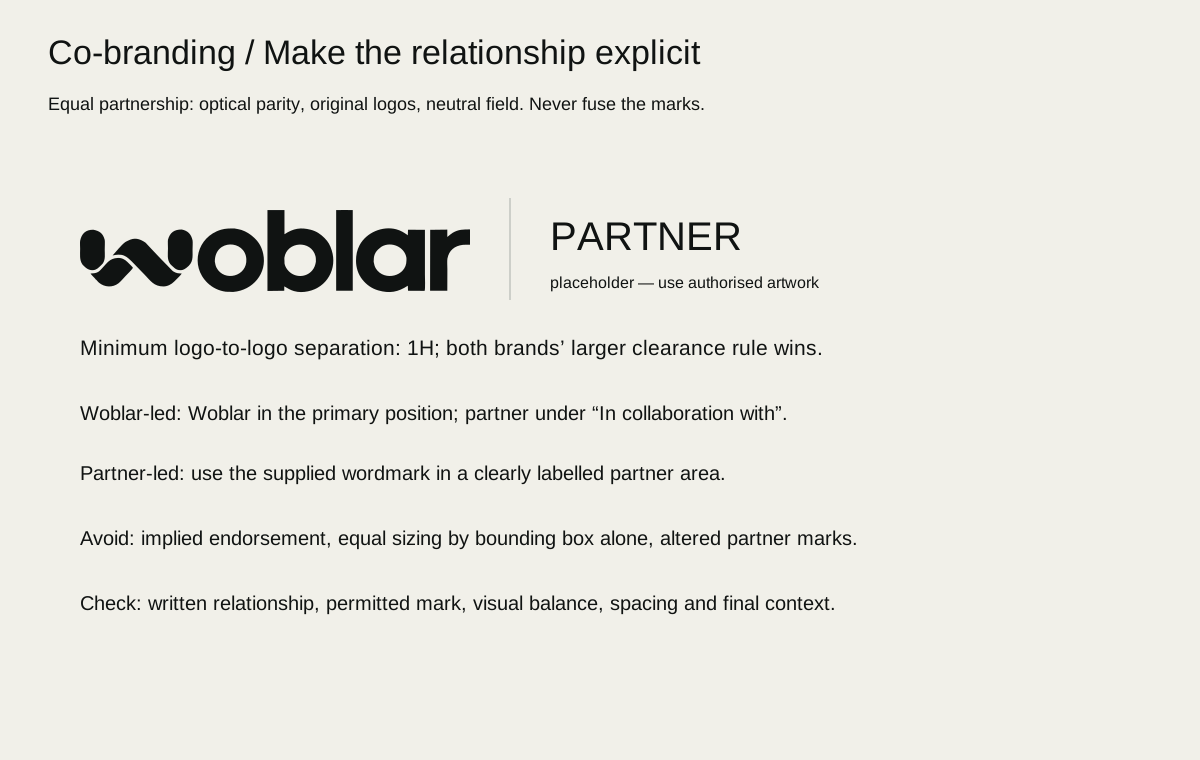
Separate Woblar and partner artwork with whitespace or a thin neutral divider. Use supplied artwork at comparable optical prominence, never by equal canvas width alone. Maintain each logo's required clear space. Use at least H between visible marks, where H is Woblar’s visible wordmark height, and increase the gap whenever the partner’s required exclusion zone is larger. With a divider, preserve each mark’s own clear space on its side. Woblar leads on Woblar-owned material; client-led work follows the agreed commissioning relationship. Never infer rank from file order. Put an accurate relationship label above or below: “Prepared by Woblar for [client]” or “Created with [partner]” only when true and authorised. A technology vendor's logo does not prove endorsement, certification or a partnership.

In URLs and filenames use readable lowercase hyphenated words. In visible copy use sentence case, preserving proper names. Do not silently rename live URLs to match this draft.

See the co-branding specimen.

Operating rules

ARCH-001 — Keep the master brand clear

  • Do: Present services, tools and agents under Woblar with descriptive roles.
  • When: Naming and new offers
  • Variation: A temporary campaign title or descriptive capability label.
  • Avoid: New sub-brand logos, palettes or fictional staff identities.
  • Check: Identify the master brand without explanation.

ARCH-002 — Preserve current offer names

  • Do: Use AI Readiness Roadmap, AI Workflow Starter and Workflow Care accurately.
  • When: Service descriptions and sales material
  • Variation: Short contextual references after the full first mention.
  • Avoid: Inventing prices, inclusions or guarantees from the names.
  • Check: Compare names and scope with the current offer source.

ARCH-003 — Describe real relationships

  • Do: Use partner artwork and relationship wording only with permission and evidence.
  • When: Co-branding and client work
  • Variation: Optical balancing within both brands’ clear-space requirements.
  • Avoid: Implied endorsement or a merged unofficial logo.
  • Check: Check permissions, relationship text and proof at intended size.

Handbook contents · AI rules

Voice and language

Release 0.3.0-draft.1 · Development standards

Sound like a capable person explaining useful work. Clarity should survive when the subject is complex or the news is difficult.

Voice that changes with the reader's situation

SituationToneDraft example
First encounterConfident, invitingMake room for better work. Start with one useful workflow.
Explaining a serviceSpecific, groundedWe start with the tools and recurring tasks your team already uses.
Explaining AIClear about scopeThe tool prepares a draft. Your team checks it before sending.
Asking for detailsRespectful, purposefulTell us which part of the work keeps getting stuck.
ErrorCalm, usefulYour request could not be saved. Check your connection and try again.
Confirmed saved requestFactualYour request has been saved. We’ll be in touch to arrange a conversation.
Difficult updateDirect, accountableWe found a problem in the handoff. We have paused it while we check the affected records.

These examples are copy patterns. Use success or recovery wording only when the actual behaviour supports it; do not promise that input is retained without verification.

Editing examples

AvoidPreferWhy
Unlock revolutionary AI-powered transformationFind one workflow worth improvingConcrete scope
Every enquiry answered instantlyPrepare enquiry replies for your team to reviewNo unsupported guarantee
Our intelligent agent handles everythingThe agent prepares suggestions; you choose what to useVisible responsibility
Your meeting is booked!Your call request has been savedMatches the event
Oops! Something went wrongWe couldn’t save your changes. Try againNames the failure and action
Seamless integration with all your systemsWe’ll check how your current tools can connectLeaves room for actual constraints

Writing conventions

Use South African English: organisation, prioritise, colour. Use natural contractions where they aid reading. Keep headings in sentence case and buttons as short verb phrases: “Explore services”, “Request a conversation”, “Download the guide”. Use “click” only for mouse-specific instructions; otherwise “select”, “open” or the control label.

Write user-facing dates as “13 October 2026” and include Africa/Johannesburg or SAST when schedule ambiguity matters. Use YYYY-MM-DD in filenames. For local currency, write “R1,250” and make VAT/inclusions explicit when known; use “ZAR” in international or mixed-currency tables. Never infer a price. Spell out a term before its abbreviation. Prefer “AI” over repeatedly spelling out artificial intelligence when the audience already understands it.

Headings should make sense when read alone. Links should name the destination or action, not “click here”. Avoid idioms that depend on one cultural background, unexplained acronyms and jokes in errors. Alt text explains useful visual information; it does not repeat marketing slogans.

Ready-to-adapt patterns

Social: “Which follow-up keeps slipping? A useful workflow starts with one recurring task, a clear owner and a review point. Explore Woblar’s services.”

Proposal opening: “You described [verified problem]. We propose starting with [bounded workflow], using [confirmed tools]. [Role] will review [output] before [action]. Success will be assessed against [agreed measure].”

Case study: situation → agreed scope → delivered work → measured outcome and period → limitations → next step. If the outcome is not measured, describe the delivered capability and leave the result unclaimed.

Operating rules

COPY-001 — Support claims

  • Do: Attach a current source to performance, customer and comparative claims.
  • When: Copy, campaigns and sales
  • Variation: Describe bounded capabilities or label illustrative examples.
  • Avoid: Invented savings, testimonials, endorsements or guaranteed outcomes.
  • Check: Review a claim ledger containing source, date, permission and scope.

COPY-002 — Write for a decision

  • Do: Use a concrete subject, active verb and useful next action.
  • When: Headings, body copy and CTAs
  • Variation: More expressive headlines when a nearby descriptor explains the offer.
  • Avoid: Hype, jargon, false urgency or vague CTA labels.
  • Check: Read headings and actions alone; their purpose remains clear.

COPY-003 — Match the emotional moment

  • Do: Use calm factual language for errors and honest accountability for delays.
  • When: Status, support and difficult updates
  • Variation: Warm contractions in ordinary conversation.
  • Avoid: Blame, jokes at a point of failure or unsupported reassurance.
  • Check: Compare wording with the reader’s situation and known facts.

Handbook contents · AI rules

The Woblar mark

Release 0.3.0-draft.1 · Development standards

Use Logo v3 as supplied. Its distinctive geometry carries recognition across expressive images, quiet documents and functional tools.

Artwork and variants

Use the supplied ink and off-white vector variants. Keep all nine visible paths, compound counters, proportions and relationships unchanged. The SVG canvas contains whitespace: alignment and clear-space measurement must use visible artwork bounds. A flattened PSD or PNG is an export, not an editable vector master. Keep source masters unchanged and identify normalised derivatives separately.

Measurable development proposals

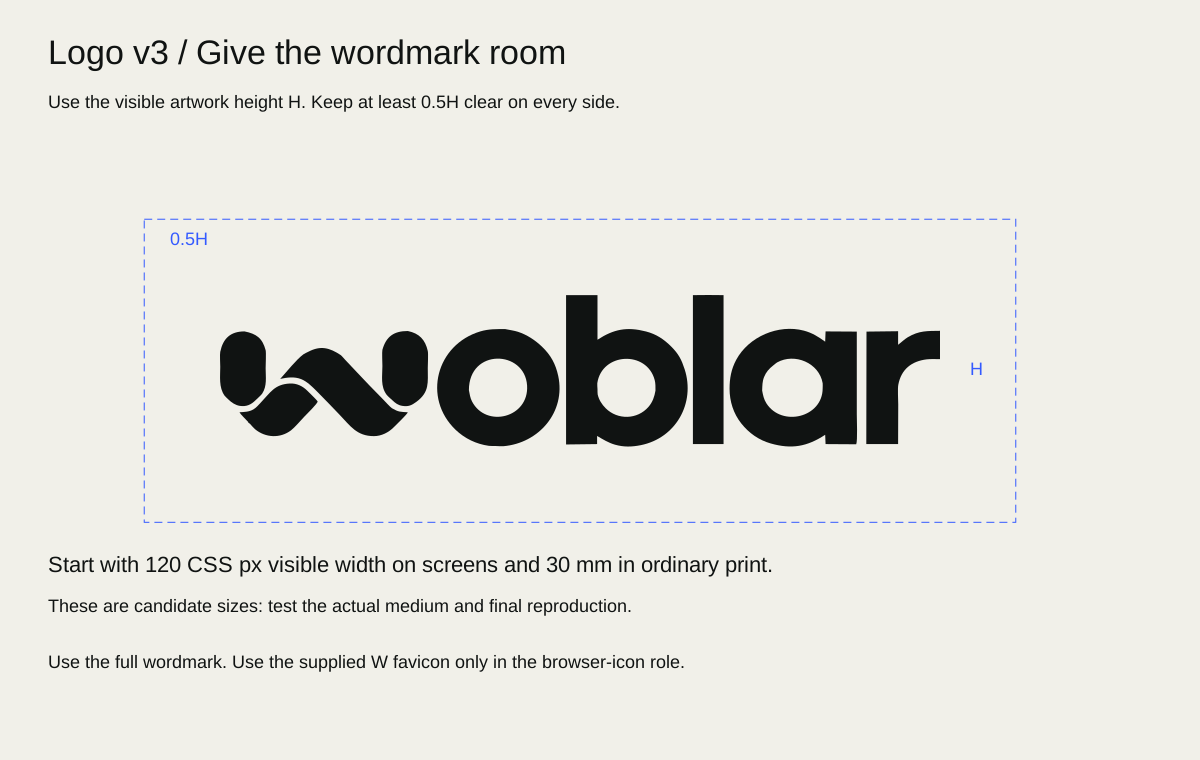
Let H be the height of the visible wordmark, excluding empty canvas. Reserve a clear zone of 0.5H on all sides; favour H on uncluttered covers and end cards. No typography, divider, crop boundary or high-contrast image edge may enter that zone. Background colour may continue through it. For a visible mark 20 mm high, the proposed minimum clear zone is 10 mm on every side. Measure after placing the artwork, not from the file’s page box.

For digital prototypes, begin at 120 CSS px visible width or larger. For print proofs, begin at 30 mm visible width or larger. These are candidate test sizes, not established reproduction minima. Compare 80/96/120/144 px on common screens and 20/24/30/36 mm on the intended stock. Inspect counters, edge clarity and reading at normal distance before accepting a minimum. Embroidery, engraving, vinyl and foil need their own supplier samples. The separately sourced favicon below is available for its narrow browser role; this does not approve a general small-format symbol.

Align the mark optically with the text column or document margin; never compensate by stretching it. On photography, place it in a stable quiet field or a separate solid band. If no safe area remains after cropping, change the composition.

Placement and the browser favicon

On a document cover, place the wordmark on the main text alignment, usually upper left or a deliberate lower-left signature. On letterhead, keep it above the correspondence area and out of the address/body flow. In a presentation, use a confident cover placement and a restrained consistent interior signature only where useful. In a campaign, place the mark in the quiet field, not on the image’s focal detail. End cards should hold the upright mark and one clear next action long enough to read.

The existing Woblar Logo v3 / 07 Favicon package records an approved-derived W favicon made in VectorCraft on 2026-10-13: four original W paths grouped on an opaque ivory square, with SVG, 16/32/512 PNGs and a native editable source. The package records visual inspection at those sizes and states it is not deployed; no ICO is included. Use that source for the browser favicon, preserving its proportions and background. This is a narrow browser application, not permission to extract another W, create an app icon, substitute the symbol for the full wordmark in stationery or treat it as a general sub-brand mark. New icon contexts require an explicit application review.

Measured full-wordmark visible bounds are x=152.8342–2009, y=155.6503–546.3088 in the original 2163×727 canvas; visible aspect ratio is approximately 4.75138:1. These geometric measurements support placement, not print legibility approval. Tight-viewBox derivatives must preserve path data and remain traceable to the source.

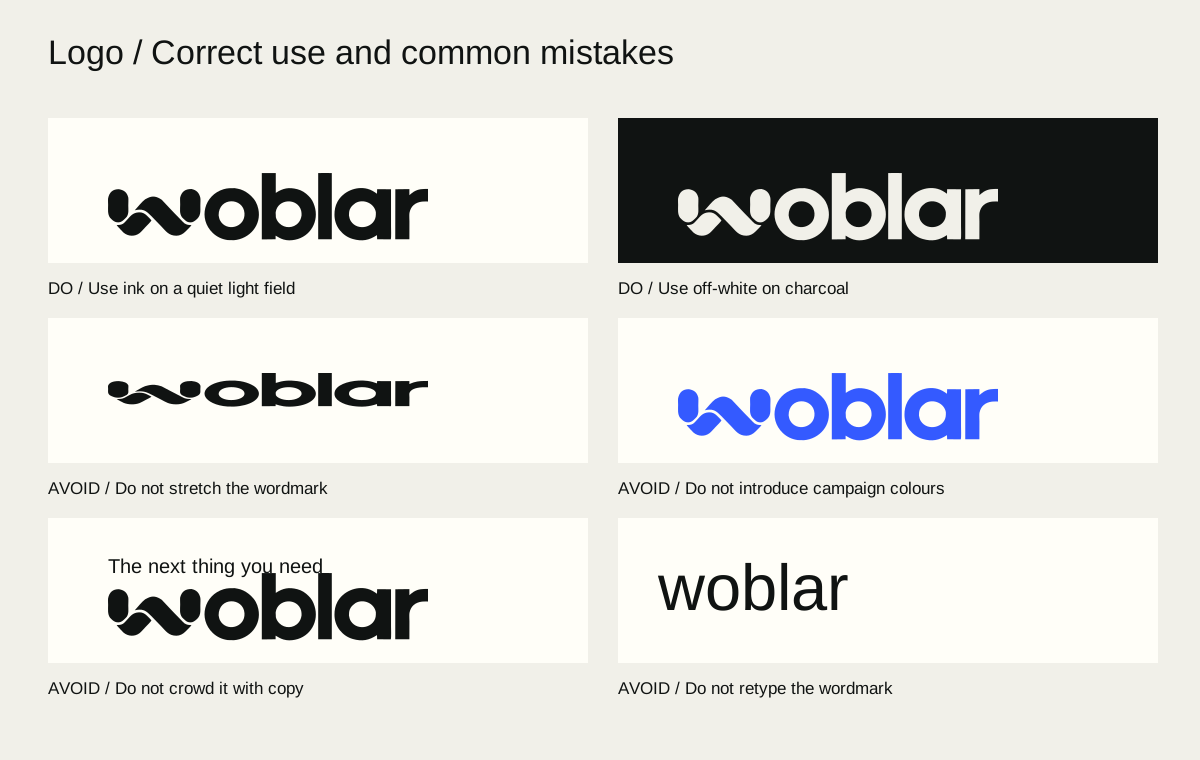
See the clear-space specimen and use/misuse plate.

Misuse and correction

IncorrectCorrect alternative
Stretch to fill a bannerScale uniformly; leave space
Rotate for energyKeep upright; create energy through crop
Recolour cobaltUse the supplied ink or off-white variant
Glow, bevel or drop shadowUse clean artwork on a readable field
Fill or distort countersRestore the vector master
Retype “Woblar”Place the supplied wordmark
Crop the markReframe the surrounding image
Place over busy detailAdd a quiet field or move the mark
Squeeze against a titleRestore the 0.5H proposed clear zone
Use an old exportLocate Logo v3 in the asset register
Build a “Woblar × Agent” markSeparate role wording from the master logo

A logo misuse plate should show the correct sample beside the error and identify the violated rule; do not distribute incorrect samples as reusable assets.

Operating rules

LOG-001 — Preserve Logo v3

  • Do: Use supplied Logo v3 geometry and proportions unchanged.
  • When: Every logo placement
  • Variation: Uniform scaling and selection of the supplied ink/off-white variant.
  • Avoid: Retyping, regeneration, stretching, recolouring or extracting an unofficial symbol.
  • Check: Compare paths and source hashes; inspect the visible mark.

LOG-002 — Give the mark space

  • Do: Use the proposed 0.5H visible-artwork clear zone in development layouts.
  • When: Covers, stationery, campaigns and interfaces
  • Variation: Increase to H or more; resolve compact exceptions through review.
  • Avoid: Measuring from empty SVG canvas or calling this a print-tested minimum.
  • Check: Measure visible bounds and nearest competing element.

LOG-003 — Test reproduction at use size

  • Do: Proof candidate sizes and processes before physical production.
  • When: Small or physical logo use
  • Variation: Larger artwork or a simpler application when detail fails.
  • Avoid: Calling a mockup, raster master or proposed size production-approved.
  • Check: Inspect real-size output and record supplier, process and accepted proof.

LOG-004 — Use the existing favicon only in its documented role

  • Do: Use the approved-derived favicon source for browser identification, with its original W proportions and ivory background.
  • When: Website browser tabs and documented favicon exports.
  • Variation: Select the provided SVG or size-appropriate PNG; retain the native source for editing.
  • Avoid: Improvised W extraction, general wordmark replacement or claiming deployment without checking it.
  • Check: Compare against the 07 Favicon source and inspect the actual browser at small size.

Handbook contents · AI rules

Colour and contrast

Release 0.3.0-draft.1 · Development standards

Charcoal provides depth, ivory provides clarity and cobalt carries emphasis. Colour is a set of jobs, not a requirement to use every swatch.

Digital colour roles

RoleValueUse
Charcoal#101312Main dark field; primary ink on light
Surface#1A1E1DQuiet secondary dark panels
Ivory#F1F0E9Primary text on dark; light document paper field
Muted#A9AEA9Secondary text on dark, subject to actual contrast
Cobalt#345AFFDistinctive accent, action fill, material channels
Highlight#A8B9FFDisplay emphasis and links on dark
Focus#91A5FFVisible focus treatment on dark

Start with roughly 70–90% neutral visual area and use cobalt deliberately for attention. This is a composition heuristic, not a quota or a pixel audit. Material images can contain broader cobalt areas when a separate reading field remains stable. A light document uses charcoal text on ivory or unprinted white; it does not become a new visual identity.

Muted grey is not a default body colour on light paper. Use charcoal for readable text. Cobalt is not a universal small-text link colour on dark; prefer highlight with a persistent non-colour cue. Keep status meanings separate from brand accents: an error needs a label/icon and action, not simply a red swatch. New semantic colours require contrast review and documented roles.

Pair-based checks

Test the rendered text/background pair, including gradients, transparency, hover, focus and disabled states. Use the applicable AA benchmarks: 4.5:1 for ordinary text; 3:1 for qualifying large text and required non-text UI boundaries. Large means at least 18 pt regular or 14 pt bold in WCAG terminology, not merely a design label called “large”. Decorative imagery and logo treatment require their own legibility judgement. A numerical contrast pass does not resolve weak hierarchy or tiny type.

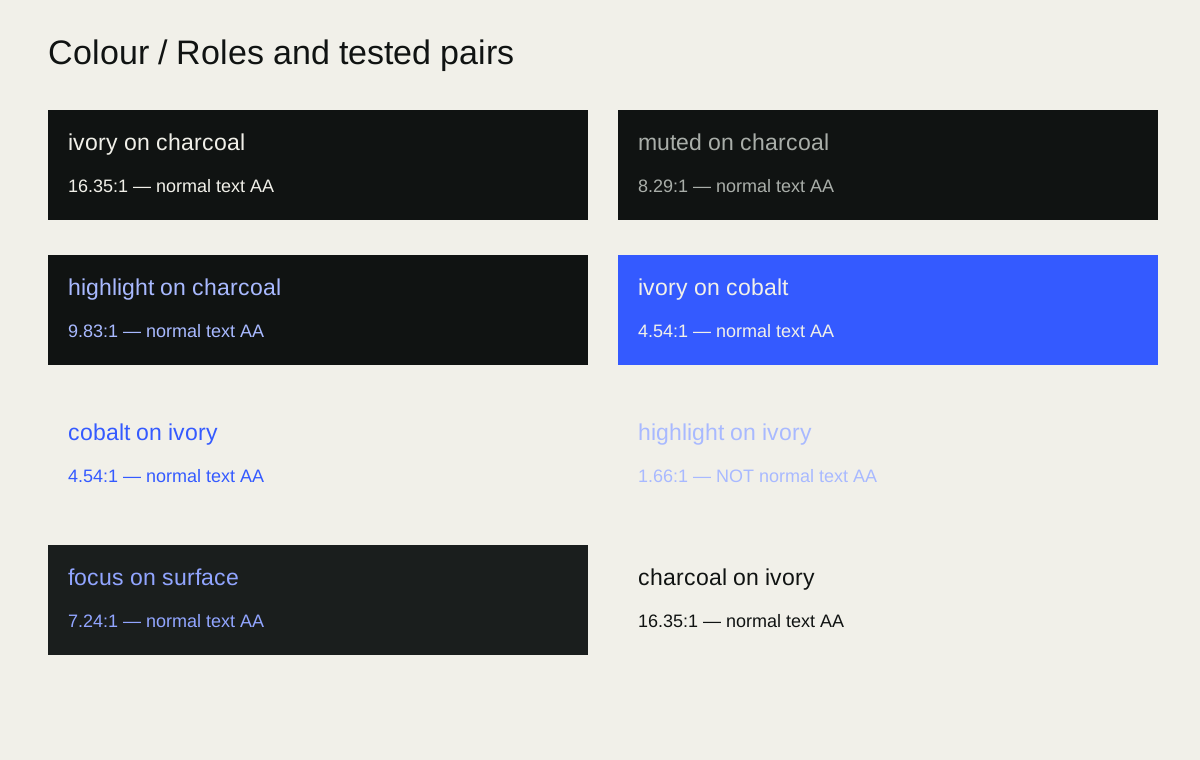
Reference solid-sRGB calculations: charcoal/ivory 16.35:1, muted/charcoal 8.29:1, highlight/charcoal 9.83:1, and focus/surface 7.24:1. Ivory/cobalt is 4.54:1, only narrowly above the ordinary-text threshold; do not weaken it with opacity or a lighter cobalt state. Highlight/ivory is 1.66:1 and fails for ordinary text. These pair calculations are not a complete accessibility test of a composition. See the contrast specimen.

For print, specify stock, process and colour profile with the supplier, then proof the conversion. There is no universal approved CMYK or Pantone equivalent in this release. Cobalt on screen is a reference appearance, not a promise of fluorescent print saturation.

Operating rules

COL-001 — Keep colour roles stable

  • Do: Use the seven defined digital colours according to their roles.
  • When: All identity applications
  • Variation: Light reading surfaces and proportion changes within the same palette.
  • Avoid: Returning to superseded terracotta, serif/lime direction palettes.
  • Check: Compare values and semantic use with this chapter.

COL-002 — Check pairs, not swatches

  • Do: Verify actual foreground/background contrast and non-colour status cues.
  • When: Text, controls, charts and focus
  • Variation: Adjust placement, backdrop or role to achieve readability.
  • Avoid: Assuming a palette or image overlay automatically passes.
  • Check: Record measured pairs at the worst visible state.

COL-003 — Separate print and screen colour

  • Do: Use supplier-profiled conversions and a proof for print.
  • When: Physical production
  • Variation: Accept documented process-specific variation after review.
  • Avoid: Invented universal CMYK/Pantone matches or untested neon promises.
  • Check: Record profile, stock, process and approved sample.

Handbook contents · AI rules

Typography

Release 0.3.0-draft.1 · Development standards

Geist carries the identity with a clear, contemporary voice. Regular headlines provide confidence through scale and space, while body copy stays comfortable to read.

A flexible hierarchy

These are recommended starting ranges, not a copy of website styles. Choose by viewing distance, copy length and medium; reduce scale before breaking a heading into awkward fragments.

RoleDigital starting rangePrint/slides starting rangeGuidance
Display40–88 pxCover 30–56 pt; slides 36–64 ptGeist 400; 0.98–1.12 line height; modest tight tracking
Section heading26–40 px18–30 ptGeist 400; 1.1–1.25 line height
Subheading20–26 pxPrint 13–18 pt; slides 28–36 pt400–500; 1.2–1.35 line height; subordinate to section heading
Body16–20 pxPrint 10.5–12 pt; slides 20–28 pt400; 1.45–1.7 line height
Label / button14–16 px10–12 pt400–600; concise, sentence case
Caption / notes13–15 px9–10 ptDo not compress vital information into footnotes
Data / tables14–18 px10–12 pt; slides 18–24 ptAlign numbers; use tabular figures where available

Start display tracking around −0.02em and body at normal spacing. Avoid applying tight display tracking, all caps or condensed line spacing to paragraphs. Body measures of roughly 45–75 characters aid comfortable reading; narrow screens may require shorter lines. Keep paragraph spacing visibly greater than ordinary line spacing.

Use emphasis sparingly: one highlighted phrase or one weight change should be enough. Do not turn every important sentence into a bold block. Functional labels may use medium/semibold, but do not make heavy headlines the default.

Titles, subtitles and heading sequence

Use the main title to state the subject or promise; use a subtitle to explain context, not to repeat it. A subtitle typically sits between body and section-heading size at regular weight, with more relaxed line spacing than the display title. Do not imitate hierarchy by colouring every line differently. Keep H1/title → H2/section → H3/subsection progression logical, and use style names in editable documents rather than hand-formatting each instance. In an interface, visible size may adapt but semantic heading order remains meaningful.

Keep headings closer to the content they introduce than to the previous section. Aim for roughly 1.5–2 times the ordinary paragraph gap before a heading and a smaller gap after it. Avoid single-word final lines where a natural alternate line break exists; do not damage the sentence to make a shape. Links need an identifiable treatment beyond an arbitrary colour change. UI labels should remain readable at their actual control size and must not rely on placeholder text.

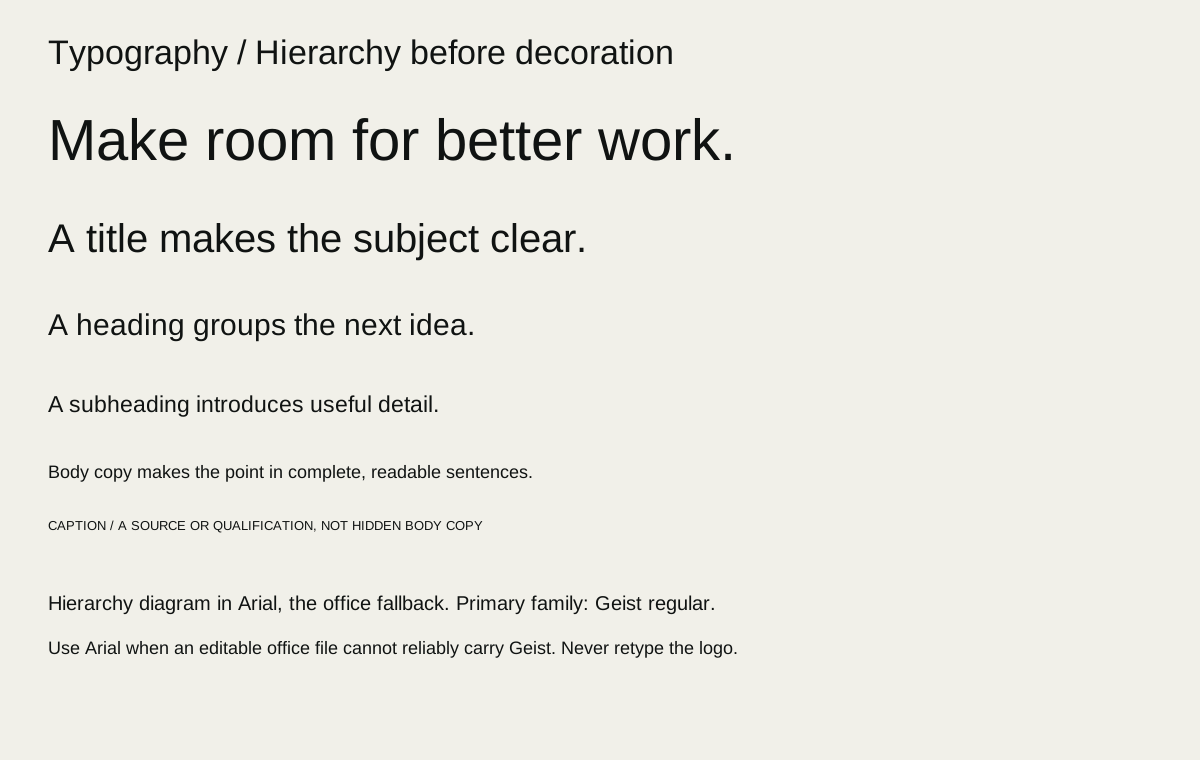
See the type hierarchy specimen.

Files, fallback and languages

Geist’s local variable font and its OFL licence are the source reference. Keep licence text with redistributable font packages and verify the actual files used in a delivered template. Retain editability and embed fonts where the format and licence allow it. When Geist cannot be installed, use a deliberate Arial fallback and reflow/review the document; substitution is a compatibility choice, not a second identity family. Do not assume every script or glyph is covered: test names, currency, punctuation and the actual language required.

The Source Serif files in earlier review assets belong to a superseded proposal. Their presence and licence do not authorise their use in this direction. Do not use serif headlines, decorative code fonts or synthetic extra weights as an automatic route to variety.

Specimen checks: “Make room for better work.”; “AI Readiness Roadmap”; “13 October 2026 · R1,250”; long organisation names; accented names; a two-line button; a numeric table; an underlined link; and a paragraph at actual size.

Operating rules

TYPE-001 — Keep Geist regular at the centre

  • Do: Use Geist regular for display and headline hierarchy.
  • When: Brand headlines and covers
  • Variation: Scale, line breaks and restrained emphasis suited to the medium.
  • Avoid: Serif replacement directions or heavy weights as the default display voice.
  • Check: Compare headline specimens across campaign, document and interface.

TYPE-002 — Protect reading comfort

  • Do: Choose body size, measure and spacing for the actual reading environment.
  • When: Documents, tools and detailed content
  • Variation: Increase type size and simplify content for distance or accessibility.
  • Avoid: Tiny disclaimers, compressed paragraphs or display tracking in body text.
  • Check: Read at intended size; test zoom, reflow and long content.

TYPE-003 — Deliver usable typography

  • Do: Include permitted font/licence files or document the fallback.
  • When: Agency and office handover
  • Variation: Arial fallback with a reviewed reflow when Geist is unavailable.
  • Avoid: Calling missing or substituted fonts a verified editable template.
  • Check: Reopen the file on the target application and inspect glyphs and wraps.

Handbook contents · AI rules

Composition and the three treatments

Release 0.3.0-draft.1 · Development standards

Choose the treatment that serves the moment. A person arriving, reading and completing a task needs different levels of visual intensity within the same recognisable brand.

Treatment selector

TreatmentBest suited toCompositionRestraint
A — Cinematic continuityAwareness, homepage entry, brand introductionWide material environment, generous dark copy field, large regular headlineOne dominant scene; static equivalent; reading stays stable
B — Quiet precisionGuidance, tools, proposals, policies, reportsStrong type hierarchy, thin dividers, modest panels, generous marginsDetail earns its place; no decorative obstacle to a task
C — Material focusCampaigns, covers, details, feature announcementsClose crop of a purposeful cobalt/metal/ivory object, concise copyKeep a service descriptor and a clear route onward

These coexist. A cover may use C and the report inside B; an entry scene may use A before a form uses B. Do not assign different fonts or palettes to them.

Composing from content

Start with one dominant message, one supporting explanation and one primary next action. Use a common left edge for mark, headline and supporting text when appropriate. Align fields, labels and data precisely. Campaign imagery may cross a grid; functional controls should not.

For digital layouts, start with 20–24 px side margins on small screens and increase with space. For A4 documents, start with 18–24 mm margins. For campaigns, reserve at least 8–10% of each edge as a working safe area before platform overlays are known. These are starting choices, not universal export specifications.

Use a simple spacing rhythm based on 4/8 units digitally or an equivalent small modular interval in print. Distinguish related items with a small gap, groups with a larger gap and sections with a clearly larger pause. Avoid tuning dozens of unrelated values by eye.

Crop and density

Protect the mark, main message and CTA at every target crop. An image that works in landscape may need a separately composed portrait version. Keep key subject detail away from type. A busy image plus a gradient is not automatically a reading field: inspect the brightest and most detailed frame or crop beneath text.

For an overfull layout, first shorten or sequence the content, then increase space or pages. Do not shrink everything equally. For a quiet layout that feels empty, strengthen hierarchy or add a useful example before adding decorative cards.

Example route: A homepage introduction establishes possibility → B service detail explains scope → B enquiry form completes the action. Campaign route: C portrait ad introduces one workflow → B landing page provides evidence → a truthful request CTA.

Operating rules

LAY-001 — Choose a treatment by reader task

  • Do: Select A for entry, B for reading/tasks, C for campaign/detail emphasis.
  • When: New layouts across media
  • Variation: Combine treatments across an experience with a consistent core.
  • Avoid: Treating them as competing sub-brands or applying cinematic density everywhere.
  • Check: Explain the treatment choice in one sentence tied to the reader’s task.

LAY-002 — Give each composition one lead

  • Do: Establish a dominant idea, supporting detail and a primary next action.
  • When: Campaign, page, slide and cover layouts
  • Variation: Secondary actions when clearly subordinate.
  • Avoid: Multiple equally loud messages or decorative hierarchy.
  • Check: A quick first glance reveals the intended message.

LAY-003 — Design for each crop

  • Do: Keep copy, mark and useful subject matter safe at target sizes.
  • When: Responsive layouts and multi-format campaigns
  • Variation: Purpose-built re-crops or separate compositions.
  • Avoid: Stretching one artwork or hiding content behind platform overlays.
  • Check: Inspect each actual output at normal viewing size.

Handbook contents · AI rules

Imagery, illustration and agents

Release 0.3.0-draft.1 · Development standards

Images should make work feel tangible. Cobalt channels, brushed metal and ivory work items offer a material language for movement, sorting and review without pretending to document a live system.

Image categories

Material illustration: carefully lit physical-feeling structures that suggest a bounded flow. One entrance, a comprehensible route and a visible pause/review point are more useful than a maze. Dark charcoal surroundings, brushed metal, restrained cobalt and ivory objects carry continuity.

Documentary photography: real people, locations and work with permission and accurate captions. Choose natural actions and credible settings. Do not stage technology spectacle or use generic smiling teams as evidence of Woblar staff or clients. Depict South African contexts thoughtfully without reducing them to flags, landmarks or stereotypes.

Diagrams: explicit labels, directions and review points. Use fewer elements and readable text. Distinguish illustrative process from implemented system. Keep decorative material scenes separate from diagrams meant to explain exact operations.

Original generation recipes

Recipes are briefing templates; insert a specific purpose, format and copy zone. They are not promises about a model’s output.

A / environment: “Create an original wide material illustration for Woblar about [bounded task]. Charcoal #101312 environment; brushed metal structure; one cobalt #345AFF channel carrying a few ivory work items; visible pause where a person would review, without showing a person. Controlled side lighting, believable material detail, restrained reflections. Reserve the left 45% as a quiet dark field for separately composed typography. No text, logos, interfaces, symbols of certification or dramatic sci-fi glow. Supply a crop that also preserves the subject in portrait.”

C / detail: “Original close material study of [one useful mechanism] in the Woblar language: cobalt channel, brushed metal and ivory object against charcoal. One clear focal point, generous shadow field in [copy zone], tactile surface, controlled highlight. Do not imply a real product photograph. No words, logos, people, neon green, terracotta or ornate decoration.”

B / explanation: “Design a simple original diagram of [verified steps] with charcoal and ivory, restrained cobalt connectors and explicit human review at [step]. Keep labels as a separate editable layer. No invented integrations or undocumented steps. Prioritise comprehensible direction and enough room for accessible labels.”

Agent family

Agents are roles, not invented employees. Use one abstract material family with consistent camera, light and background, varying the role-specific object: a search agent may use a focused aperture or indexed planes; a content agent may use ordered ivory sheets and a review gate. These are proposals for art direction, not delivered or approved portraits. Avoid faces, humanoid robots and implied autonomous authority. Caption “Woblar [role] agent” and describe the bounded job. A role image must never stand in for capability evidence.

Provenance and review

Record provider, exposed model identifier (or “not exposed”), generation date, full prompt, references and rights, selected output, edits, crop versions and reviewer. Composite supplied logo and important type separately. Review geometry, repeated artifacts, unintended marks, misleading cultural cues and whether the scene suggests an untrue process. Describe useful content in alt text; mark purely decorative imagery appropriately in the publishing medium.

Operating rules

GEN-001 — Keep illustration separate from evidence

  • Do: Label generated fictional scenes where their context could imply real people, clients or systems.
  • When: Generated imagery and mockups
  • Variation: Original illustrative material environments.
  • Avoid: Generated staff/customer identities or scene-based proof of a business claim.
  • Check: Review image, caption, alt text and surrounding copy together.

IMG-001 — Give each image a job

  • Do: Brief purpose, subject, copy zone, crop and treatment before producing imagery.
  • When: Photography, illustration and generation
  • Variation: Material detail or documentary photography with correct provenance.
  • Avoid: Blog references, generic AI spectacle or ornamental complexity that obscures the task.
  • Check: The image supports the same message as the copy.

IMG-002 — Record reproducible provenance

  • Do: Save prompt, references, permissions, provider/model disclosure and edit history.
  • When: Generated or commissioned assets
  • Variation: Record unavailable model details honestly.
  • Avoid: Guessing model identifiers or losing source rights during export.
  • Check: Trace each selected asset back to its source and review record.

AGENT-001 — Present agents as bounded roles

  • Do: Use a consistent abstract role system and explain the actual responsibility boundary.
  • When: Agent imagery, names and profiles
  • Variation: Role-specific material objects within one visual family.
  • Avoid: Fictional employees, independent logos or invented capabilities.
  • Check: Read name, visual and description together for misleading implications.

Handbook contents · AI rules

Digital components and states

Release 0.3.0-draft.1 · Development standards

Interfaces express the brand through readable hierarchy and truthful behaviour. The component should help a person finish the task with confidence.

Component contract

ComponentRequired content and statesDesign decision
Button / linkClear label; default, hover, focus; loading/disabled where relevantOne primary action per local task; distinguish navigation from action
Field / selectPersistent label, help, required/optional state, error and retained value when supportedError beside the field plus summary for long forms
Checkbox / radioLabel, checked, unchecked, disabled and focusShow choice and consequence without colour alone
AlertSeverity, explanation and next actionUse icon/text; avoid ephemeral messages for vital failures
Tabs / accordionActive/expanded state; keyboard behaviour; meaningful headingsDo not conceal required steps or essential disclosures
Navigation / breadcrumbsCurrent location, destination labels, compact statePreserve orientation on small screens
DialogTitle, close/cancel, focused entry, focus returnUse only when a contained interruption is necessary
CardTitle, useful supporting content, explicit destination/actionAvoid nested competing interactive targets
TableCaption, headers, units, missing-value meaning, overflow strategyAlign comparable data; preserve header relationships
TooltipShort supplementary information, focus accessNever the only source of required instructions
PaginationCurrent page and next/previous labelsPreserve filters and announce updated content appropriately
DownloadFile type, size when known, purpose, access/availabilityDo not imply the file exists until it does
ConsentSeparate purposes, meaningful choices, saved stateNo visual pressure or preselected optional consent

Content limits should be tested with long names and translated or expanded copy. Avoid brittle character caps as a substitute for responsive layouts. Use wrapping and simpler copy before clipping essential information.

State language

Empty: explain what belongs here and offer one next action. Loading: state the operation; show a loader only while work is pending. Error: identify the failed operation, preserve safe input where implemented, offer recovery. Success: name the completed event. Unavailable: explain the limitation and offer an honest route onward; do not disguise it as an empty result.

For AI tasks, explain the supplied input, destination/provider when relevant to the decision, explicit trigger, output and review point. Differentiate “draft prepared”, “suggestion selected”, “approved” and “executed”. Never make a decorative progression look like actual autonomous activity. Product privacy statements must be verified with the actual implementation; this handbook does not settle past conflicting disclosures.

Inclusive operation

Use semantic controls, logical keyboard order, visible focus and accessible names. Design at narrow widths and with enlarged text. Keep touch targets comfortably usable; 44 px is a helpful design target, not a claim that every component already conforms. Test screen-reader announcements for asynchronous changes and prevent focus from disappearing behind overlays. Reduced motion must preserve meaning.

Operating rules

UI-001 — Make actual side effects clear

  • Do: Describe what a control actually does and who acts next.
  • When: Forms, tools and AI flows
  • Variation: Separate preparation, approval and execution states.
  • Avoid: Calling a saved request a booking or a prepared output an executed action.
  • Check: Compare labels and confirmations with implemented behaviour.

UI-002 — Design complete states

  • Do: Define empty, loading, error, success and unavailable behaviour alongside default.
  • When: Every data-dependent or interactive component
  • Variation: Omit irrelevant states with an explicit reason.
  • Avoid: Showing indefinite success-like loaders or blank failures.
  • Check: Exercise representative state transitions and recovery.

UI-003 — Preserve accessible operation

  • Do: Make controls understandable and usable by keyboard, touch and assistive technology.
  • When: Digital products and portals
  • Variation: Responsive rearrangement that preserves reading and focus order.
  • Avoid: Colour-only meanings, hidden focus or essential text inside images.
  • Check: Test keyboard, focus, names, announcements, reflow and text scaling.

Handbook contents · AI rules

Motion, film and sound

Release 0.3.0-draft.1 · Development standards

Movement should explain change or establish atmosphere. The person using the experience remains in control.

A small vocabulary

PurposeRecommended starting behaviourStatic alternative
Hover / focus feedback120–180 ms restrained colour or opacity changeImmediate state change
Panel transition180–280 ms ease-out; short travel of 8–16 px if usefulDirect replacement
Section entrance300–500 ms; low distance; once, not on every scrollFully visible content
Workflow explanationDeliberate steps with readable labels and a pause at reviewNumbered diagram
Ambient material sceneSlow environmental motion without urgent flashingChosen still poster

These ranges guide production trials. They do not describe an installed animation system. Avoid bounce, elastic logo motion and gratuitous parallax. A loading indicator communicates pending work; a progress percentage requires a real measurable basis.

Storyboards across formats

Landscape 16:9: establish the task → show one material movement → hold at the review point → end on the supplied mark, descriptor and next action. Portrait 9:16: begin close to the meaningful object; keep the central action visible; place separately composed captions in a verified safe area; use a dedicated end card. Do not simply cut a landscape film down the middle.

Hold key copy long enough to read aloud comfortably. Check first, intermediate and final frames plus the whole duration. Provide captions for speech and meaningful audio. Lower thirds name real people/roles accurately. Thumbnails should work without motion and not imply a result the film does not demonstrate.

Sound

No autoplay audio. Use sound only when it improves comprehension or a deliberately played piece. Speech takes priority over music; duck the bed and check on ordinary phone speakers and headphones. Set delivery loudness/peaks against the actual platform brief and record the measured export, rather than inventing a universal target. Music, voices and effects need suitable licences and provenance. No sonic signature is approved by this release.

Check pause/replay controls where needed, reduced-motion output, flashing risk and readability over moving backgrounds. A still export is not proof that the full film is safe or complete.

Operating rules

MOT-001 — Make motion purposeful

  • Do: Tie movement to explanation, state change or a controlled atmosphere.
  • When: Web, presentations and video
  • Variation: Timing adjustments after readability and performance review.
  • Avoid: Unnecessary looping, flashing or logo geometry transformations.
  • Check: State the motion’s purpose and inspect the full duration.

MOT-002 — Provide an equivalent quiet path

  • Do: Preserve information in reduced-motion and static versions.
  • When: Motion-based content
  • Variation: A poster, numbered diagram or immediate state change.
  • Avoid: Requiring animation to reach essential content or understand status.
  • Check: Compare meaning and task completion with motion disabled.

SND-001 — Make audio deliberate and usable

  • Do: Require a user-initiated playback path, clear speech and licensed sources.
  • When: Film, sound effects and music
  • Variation: Context-appropriate music with captions and controlled mix.
  • Avoid: Autoplay audio or claiming an unreviewed sonic identity.
  • Check: Check rights, caption accuracy, actual export levels and ordinary-device playback.

Handbook contents · AI rules

Documents and presentations

Release 0.3.0-draft.1 · Development standards

A useful document should carry the identity without asking the reader to work through decoration. Use Quiet precision for sustained reading and selective material imagery for entry.

Application recipes

ApplicationStructureIdentity treatment
ProposalContext, scope, approach, responsibilities, schedule, fees/assumptions, next stepB interior; optional C cover; clear editable tables
ReportExecutive finding, evidence, interpretation, action, methods/limitsB; data gets room; numbered figures with sources
Case studySituation, scope, delivered work, measured result, limitsA/C opening only if truthful; B evidence
One-pagerOne purpose, three useful points, proof/boundary, next stepA or C top, B information block
Slide deckOne idea per slide; argument across slides; evidence in notesC opener, B content, deliberate section breaks
LetterheadMark, correspondence, verified contact/legal detailsLight B; restrained footer; real document styles
Email signatureReal name/role, Woblar, verified contact linksCompact text-first; optional supplied logo; no giant banner

Use A4 as the local document starting format and 16:9 for general screen presentations; confirm the recipient’s actual requirement. Use consistent heading styles, real lists, running page numbers and a useful contents structure for long documents. Keep body pages light when printing is likely; dark covers may work as digital editions but create a different print cost and reproduction question.

Data is content

Every chart needs a clear question, units, period, source and honest scale. Use direct labels where practical and distinguish series beyond colour. Missing data is not zero. Do not insert decorative dashboards with fictional performance figures into a real sales claim. If a chart is illustrative, label it at the point of use.

Editable handover

Deliver source files with real text, shapes, tables and reusable styles, plus a separate viewing export. A full-slide image is not an editable deck. Reopen the source in the recipient’s application and inspect fonts, line breaks, links, tables and page/slide boundaries. Check reading order and accessibility where the format supports it. A PDF preserves appearance, but does not by itself establish accessibility or editable source quality.

For presentations, test from the back of the intended room or at the actual remote-viewing size. Move dense evidence into a readable appendix instead of shrinking a table to fit. Speaker notes can add depth but should not contain undisclosed caveats essential to interpreting the slide.

Operating rules

DOC-001 — Design for sustained understanding

  • Do: Use B for reading, with clear hierarchy and source-backed evidence.
  • When: Reports, proposals and slide content
  • Variation: A/C covers and section openings when they aid orientation.
  • Avoid: Applying full-bleed cinematic layouts to every content page.
  • Check: Read the document end-to-end and identify the argument and next step.

DOC-002 — Keep delivered sources editable

  • Do: Use real styles, text, tables and shapes; provide a separate viewing export.
  • When: Office templates and agency deliverables
  • Variation: Flattened decorative imagery within an otherwise editable file.
  • Avoid: Advertising a full-page image as an editable template.
  • Check: Reopen, edit a heading/table and re-export in the target application.

DATA-001 — Make data interpretable

  • Do: Include units, period, source, scale and missing-data meaning.
  • When: Charts, tables and evidence slides
  • Variation: Illustrative data clearly labelled at point of use.
  • Avoid: Invented results, misleading axes or colour-only series.
  • Check: Compare the visual with its underlying source and intended claim.

Handbook contents · AI rules

Print and physical production

Release 0.3.0-draft.1 · Development standards

Translate the identity for the process. The goal is a recognisable, readable object, not a literal reproduction of screen colour or every digital effect.

Starting specifications to confirm

ItemDesign starting pointRequired production decision
Business cardSimple light/dark face, mark and essential verified detailsSupplier trim size, bleed, stock, finish, safe area
LetterheadA4 light field; readable body and compact footerPrinter margins, stock, mono reproduction
SignageFew words, large mark and strong contrastViewing distance, material, lighting, fixing and local constraints
MerchandiseRestrained placement, supplied logoImprint area, method, colour count and durability sample
Embroidery / engravingLarger simple placementReproduction sample preserving counters and geometry
PackagingOnly for a confirmed use caseDieline, substrate, statutory copy and supplier approval

A 3 mm bleed and 4–5 mm internal safety margin can be working layout assumptions for a small print item. They must be replaced by the supplier’s specification before production. Do not infer business card dimensions from a mockup. Keep crop marks, bleed and production instructions out of ordinary digital viewing exports.

Use a colour-managed workflow agreed with the supplier. Confirm black treatment, total ink limits, transparency handling, image resolution at placed size and font embedding. “300 ppi” is a useful image starting target for many small print formats, not a universal rule for signage or vector work. Outlined type can be a supplier derivative; preserve the editable source and font licence separately.

Unprinted stock can stand in for an ivory/light field if its tone is accepted in the proof. Reversed fine text, foil, embossing and spot finishes should be sparing and tested. Do not redraw or thicken the mark to suit a process: change scale or process, or request a separately reviewed production solution.

Proof record

Record supplier, job, date, dimensions, profile, stock, process, finish, artwork version, proof type, reviewer and accepted deviations. Inspect actual-size output under ordinary light. A rendered mockup demonstrates a composition; it does not test ink spread, foil registration, stock colour or manufacturing tolerances.

Operating rules

PRINT-001 — Qualify print readiness

  • Do: Confirm process, stock, profile, trim and supplier proof before production.
  • When: Physical output
  • Variation: Concept mockups clearly identified as such.
  • Avoid: Calling unprofiled RGB artwork or an untested mockup press-ready.
  • Check: Inspect production export and accepted proof record.

PRINT-002 — Adapt the application, preserve the identity

  • Do: Change scale, placement or production process when detail cannot reproduce.
  • When: Embroidery, engraving, signage and finishes
  • Variation: Larger marks and simpler surrounding content.
  • Avoid: Redrawing counters or distorting Logo v3 for convenience.
  • Check: Check a supplier sample at normal viewing distance.

PRINT-003 — Separate viewing and manufacturing files

  • Do: Deliver a readable review export separately from supplier-specific artwork.
  • When: Print handover
  • Variation: A documented supplier derivative with embedded/outlined type as agreed.
  • Avoid: Sending crop-marked production art as the everyday digital document.
  • Check: Check filenames, export settings and source/editability inventory.

Handbook contents · AI rules

Campaigns and social applications

Release 0.3.0-draft.1 · Development standards

A campaign can be vivid without becoming another brand. Lead with one recognisable piece of work and make the next step credible.

Build a campaign family

Start with the audience, task, supported message, destination and desired action. Choose A when establishing a larger environment or C when one material detail can carry the idea. Use B when the audience needs explanation or a multi-card sequence.

A campaign family can contain a square feed post, portrait story/reel cover, wide banner, email header and landing page. Verify current platform dimensions and overlay-safe regions at production time; the following are composition examples, not current platform specifications.

Square: one material focal point, headline of roughly 4–9 words, short descriptor and recognisable brand. Portrait: generous top/bottom safety, one vertical movement, copy in a stable field. Wide banner: shorten the message and keep the mark legible; do not squeeze the square composition sideways.

Example concept: one follow-up worth improving

Headline: “Make the next follow-up clearer.” Support: “Start with a focused workflow around your tools and your team.” CTA: “Explore services.” Visual: an ivory work item pauses at a visible review point in a cobalt channel; dark copy field; supplied logo composed separately.

This is proposed campaign copy, not evidence that Woblar has measured a follow-up improvement. Do not add fabricated inbox counts, customer names or performance numbers to make it look proven.

For a carousel, make each panel useful alone: recognisable friction → bounded possibility → human review → next step. Do not bury essential limitations only in the final card. Social captions can explain more than the image; alt text should explain the image’s purpose rather than duplicate the full caption.

Email should remain text-readable when images are blocked. Use a genuine sender, descriptive subject and permission-appropriate distribution; a brand template does not authorise sending or establish marketing consent. Landing pages must deliver the offer and action the campaign promises.

Operating rules

CAM-001 — Keep a campaign tied to its destination

  • Do: Match the headline, capability, CTA and landing experience.
  • When: Advertising, social, email and landing pages
  • Variation: Different crops and shorter messages for each format.
  • Avoid: Promising a download, booking or result the destination does not provide.
  • Check: Follow the destination as a reader and compare the promise.

CAM-002 — Make variation recognisable

  • Do: Vary composition and material crop while preserving mark, colour roles and type.
  • When: Campaign families
  • Variation: A/C expression with B explanation.
  • Avoid: New identity palettes, font families or unofficial marks for each campaign.
  • Check: Review a contact sheet of all formats together.

CAM-003 — Verify the output context

  • Do: Confirm current dimensions, overlays and readable scale before final export.
  • When: Platform-specific media
  • Variation: Dedicated versions for each placement.
  • Avoid: Assuming an old template or a single crop fits every channel.
  • Check: Preview each intended placement with its actual safe regions.

Handbook contents · AI rules

Governance and release

Release 0.3.0-draft.1 · Development standards

A brand system is useful when people can tell which decisions are firm, which files to use and when a departure needs review.

Decision and release status

The current website identity is accepted for development. This exact 0.3.0-draft.1 package remains a draft production release. Logo preservation and blog exclusion are binding owner constraints; recommended dimensions, application recipes and new rules are proposed operating standards. A coherent handbook is not itself proof of print, accessibility, licensing or production approval.

Use separate records for approval (draft → review → approved → deprecated), technical verification (not run / pass / fail / blocked), and distribution (internal / named partner / public). A publicly accessible file can still be a draft. An approved asset may remain private.

Leigh / Woblar owns approval. Contributors may make documented proposals and reversible review artifacts within their task. Changes to logo geometry, brand architecture, core palette/family, material commercial claims or publication require the relevant owner decision. Routine crop, layout and typographic scale choices can be made within this system and reviewed with the deliverable.

Exceptions

Record the affected rule ID, purpose, audience/medium, proposed departure, reason, risk, scope, expiry, owner decision and evidence. Prefer the smallest departure that solves the problem. An approved exception for one supplier or campaign does not silently amend the general rule.

Asset lifecycle

Use descriptive filenames with purpose, variant, dimensions where helpful and version. Keep a source master, editable working source and exports distinct. Record provenance and licences in the asset register. Deprecation should identify the replacement and migration scope; preserve historical releases instead of overwriting their evidence. Do not treat old review art as a default because it is easier to find.

The existing /brand library is an authorised supporting reference after verification against this direction and the source assets. It is not automatically the authority for every old rule. Earlier terracotta, serif and lime-led concepts are superseded. Their files may remain for history but should never be routed into new production defaults.

Review quarterly and whenever offers, products, privacy behaviour, logo/font assets, platforms or claims change. Sample a campaign, a reading document, a tool flow and an agent output. Record findings and follow-through; a scheduled date alone is not a completed review.

Operating rules

GOV-001 — Keep release approval explicit

  • Do: Keep new rules and assets draft until the owner approves the exact production release.
  • When: Release, handover and publication
  • Variation: Prepare complete review exports under authorised development work.
  • Avoid: Equating identity direction acceptance or technical checks with release approval.
  • Check: Check release identifier, owner decision and distribution scope.

GOV-002 — Make exceptions traceable

  • Do: Record rule, reason, scope, expiry and owner decision for material departures.
  • When: Any proposed departure from fixed identity or release controls
  • Variation: Routine layout variation within documented ranges.
  • Avoid: Quietly converting a one-off exception into the default.
  • Check: Locate an exception record linked to the affected deliverable.

GOV-003 — Maintain one source of truth

  • Do: Keep versioned source, exports, asset register and deprecation links aligned.
  • When: Updates and agency handover
  • Variation: Read-only export snapshots clearly labelled with their source version.
  • Avoid: Competing independently edited manuals or silent asset replacement.
  • Check: Compare release values, asset references and replacement routes.

Handbook contents · AI rules

Agency brief and decision scorecard

Release 0.3.0-draft.1 · Development standards

Use the system to make and judge decisions. It should allow competent designers to extend Woblar thoughtfully without reproducing a website screen on every surface.

A brief an agency can act on

Task: Create [deliverables] for [audience] to help them [specific decision/action]. Business context: [verified offer, problem and current constraints]. Core message: [one supported statement]. Evidence: [sources, permissions and claim boundaries]. Expression: [A/B/C choice and why]; preserve Logo v3, Geist regular display and the defined colour roles. Content: [required copy, legal/product facts and exact CTA destination]. Formats: [sizes, languages, applications, accessibility and supplier requirements]. Assets: [registered source files, rights and editable requirements]. Deliverables: [editable sources, review exports, production variants and provenance]. Review: Leigh / Woblar; exact release and distribution scope; staged concept, application and production checks. Success: [how the communication will be judged; do not invent commercial targets].

Provide the minimum useful package: brief, relevant chapters, rules, logo/font assets with licences, a permitted reference contact sheet, source-backed copy and a deliverable checklist. Exclude credentials, unrelated client records and internal research not intended for that recipient.

Decision scorecard

Score each dimension 0 = absent/contradicted, 1 = partly resolved, 2 = clear and evidenced. Write one reason and a correction where needed. This is a proposed review aid, not an automated brand approval.

DimensionReview question
PurposeIs the audience, task and intended action clear?
RecognitionDoes the mark/type/colour/material language feel continuous with Woblar?
Treatment fitDoes A, B or C suit the reader's moment?
HierarchyCan the main message be found quickly, then read comfortably?
TruthAre claims, relationships and product states supported?
Human responsibilityAre preparation, review and action clear when relevant?
InclusionCan people read and operate it in the intended context?
CraftDo crop, alignment, rhythm, detail and reproduction feel deliberate?
AdaptabilityDoes the family work across its required formats?
HandoverAre sources, provenance, checks and release status usable?

Use 16/20 as a discussion threshold for moving a draft forward, with no zero in truth, inclusion or recognition. A score never overrides a hard failure. Stop-release failures: changed logo geometry; prohibited blog reference; fabricated claim; unusable essential interaction; unresolved asset rights; missing required supplier proof; or unapproved publication. Correct the affected issue and review again rather than averaging it away.

Concrete evaluation

A cinematic report with unreadable body copy may score well for recognition but fails its reading task: use B inside and preserve C on the cover. A quiet campaign with perfect spacing but no category descriptor may be elegant yet unclear: add the service context. A close-up material scene that suggests an automated action should be captioned as illustration or redesigned around a visible review point. A faithful screenshot used as a slide may look correct but fail adaptability and editability.

Record the outcome as “ready for next review”, “revise” or “blocked by [specific dependency]”. Only the owner’s explicit release decision changes approval status.

Operating rules

BRIEF-001 — Brief decisions, not adjectives

  • Do: Give audience, task, evidence, message, treatment, outputs and acceptance criteria.
  • When: Agency, contractor and AI assignments
  • Variation: Relevant excerpts rather than the entire source archive.
  • Avoid: A moodboard alone, vague premium/innovative requests or missing source rights.
  • Check: Another competent maker can begin without inventing scope or claims.

EVAL-001 — Use evidence to judge the work

  • Do: Apply the scorecard with reasons and correct hard failures before release.
  • When: Concept and application review
  • Variation: Context-specific weighting as an explicitly recorded review choice.
  • Avoid: Treating a high numerical score as approval or overriding a hard failure.
  • Check: Attach scores, evidence, corrections and the owner’s separate decision.

HAND-001 — Deliver only what the recipient needs

  • Do: Package the right source files, rules, licences and checks for the authorised audience.
  • When: External or partner handover
  • Variation: Named-partner assets where access is intended.
  • Avoid: Credentials, unrelated client context or unapproved public distribution.
  • Check: Inspect the exact bundle and access scope before sharing.

Handbook contents · AI rules